



 Github Stars:
 Last Commit:
  Created:
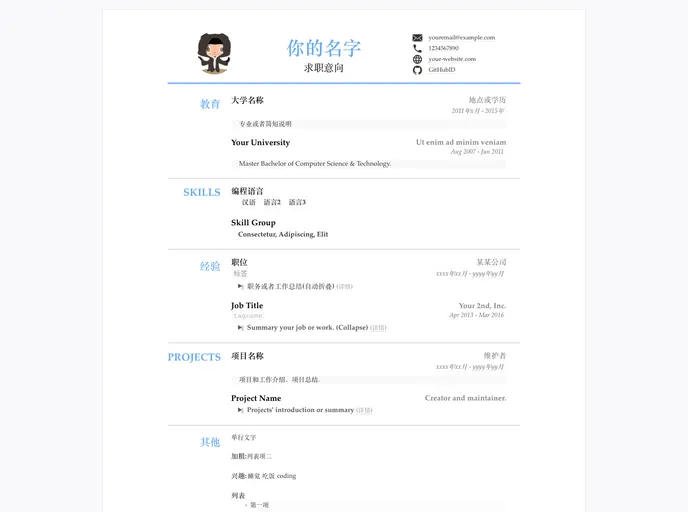
Overview
CV Generator is a resume template that automatically builds on GitHub Pages using Jekyll. It supports various data formats including markdown, yaml, and json, making it easy to write and read. The template is optimized for mobile devices and supports printing to PDF. It is compatible with multiple browsers such as Chrome, Android, Edge, IE, Safari, and Firefox.
Features
- Markdown format for easy writing and previewing
- Yaml format for easy reading and writing, supports complex nesting
- Json format for easy program conversion
- Mobile responsive design
- Optimized printing format with PDF export capability
- HTML and CSS compression
- HTML5 semantic support
- Browser compatibility with Chrome, Android, Edge, IE, Safari, and Firefox
Installation
To use the CV Generator template, follow these steps:
- Login to Github and click on the “Use this template” button
- Set the repository name as “CV” (or choose your own)
- Open the
_data/resume.yml(orresume.json) file and make necessary edits based on the comments and requirements - Save the changes by clicking on the “Commit changes” button
- Wait for the automatic compilation of the Github Pages
- Open
{your-github-id}.github.io/CV/to view the generated resume
For advanced usage and customization, you can fork the template and make modifications in the forked repository. You can also contribute to improving the template by submitting pull requests.
To export the generated resume as a PDF, follow these steps:
- Use a browser (preferably Chrome)
- Open the resume page and scroll to the bottom
- Click on the “Print” option and select “Save as PDF”
- Configure the print settings such as layout, font size, margins, etc.
To debug and locally test the template, you need to install Jekyll and run the jekyll serve command to start the local server. For custom domain setup, you can add a CNAME file with your domain name and modify the DNS’s CNAME record to {YOUR-github-ID}.github.io.
Summary
CV Generator is a Jekyll-based resume template that automates the generation of resumes on GitHub Pages. It supports various data formats, mobile responsiveness, PDF export, HTML and CSS compression, browser compatibility, and customization options. The installation process is straightforward, making it easy for users to create and publish their resumes using this template.



































