



 Github Stars:
 Last Commit:
  Created:


Overview
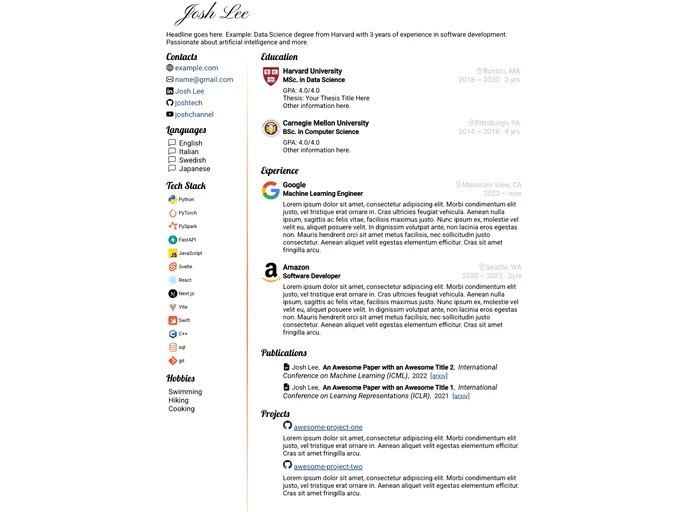
Iconic Resume is a resume template written in the Jekyll framework that provides a LinkedIn-style layout for creating professional resumes. It offers a two-column A4 design with company logos and icons to enhance visualization. Users can also add links to their social media profiles, code repositories, papers, projects, and more. The template is lightweight, easy to install, and customizable.
Features
- Two-column A4 layout: The template offers a clean and organized two-column layout that is optimized for A4 paper size.
- Company logos and icons: Users can showcase their previous work experience and affiliations by including company logos and icons.
- Social media and code repo links: It allows users to add links to their social media profiles, code repositories, papers, projects, and other relevant resources.
- Separation of contents with formats: All the contents are placed in a separate configuration file (_config.yml), allowing easy customization and formatting.
- Lightweight: The template is designed to be lightweight, ensuring fast loading times and efficient performance.
Installation
To use the Iconic Resume template, follow these steps:
Installation without Ruby and Jekyll
- Fork the repository.
- Create a gh-pages branch.
- Edit the _config.yml file in the gh-pages branch.
- Uncomment baseurl: ‘/iconic-resume’.
- Replace the dummy data with your own career details.
- Add your own logos to the imgs folder.
- Go to the Settings -> Pages page on GitHub, and select gh-pages as the GitHub Pages source.
- Wait for a few moments until the Settings -> Pages page shows that “Your site is live at https://username.github.io/iconic-resume/", where username is your GitHub username.
- Visit the provided address and right-click the page to save your resume in PDF.
- Whenever you make changes to _config.yml or any other files, commit the changes to trigger a GitHub Action that will re-build the page. Wait for it to finish before refreshing the https://username.github.io/iconic-resume/ link. The build progress can be viewed under the “Actions” tab on your forked repository.
Local Installation
- Install Ruby.
- Install Jekyll.
- Clone or download the repository to your local machine.
- Edit the _config.yml file, replacing the dummy data with your own career details.
- Put your own icons in the imgs folder.
- Open the command prompt and navigate to the repository’s directory.
- Run the command “bundle exec jekyll serve”.
- Open localhost:4000 in your browser.
- Right-click the page and click “print…” to save your resume in PDF.
Summary
Iconic Resume is a Jekyll-based resume template that offers a LinkedIn-style layout for creating professional resumes. It provides features such as a two-column A4 layout, company logos and icons, social media and code repo links, separation of contents with formats, and lightweight design. The template can be installed with or without Ruby and Jekyll, making it accessible to users with different technical backgrounds. It offers easy customization and allows users to generate their resume as a PDF file. Contributions and feedback are welcome through the GitHub repository.


































