



 Github Stars:
 Last Commit:
  Created:
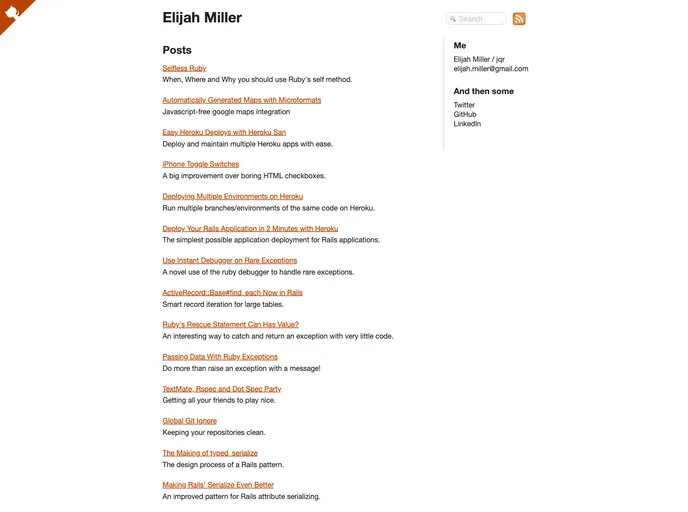
Overview:
The JQR blog theme is a stylish and modern theme designed for bloggers. With its clean and elegant design, it provides an excellent platform for showcasing blog content. The theme is easy to install and use, making it suitable for both beginner and experienced bloggers.
Features:
- Clean and modern design: The JQR blog theme features a minimalist design that is aesthetically pleasing and ensures a distraction-free reading experience.
- Responsive layout: The theme is built with a responsive layout, ensuring that your blog looks great on all devices, including desktops, tablets, and smartphones.
- Customizable: The theme offers various customization options, allowing bloggers to personalize their blogs and make them unique.
- Easy navigation: The JQR blog theme provides a user-friendly navigation system, making it easy for readers to explore different blog posts and categories.
- Social media integration: It includes social media icons and links, allowing bloggers to connect their blog with their social media profiles and increase their online presence.
- SEO-friendly: The theme is designed with search engine optimization in mind, helping bloggers to improve their blog’s visibility and rankings in search engine results.
- Fast loading speed: The JQR blog theme is optimized for speed, ensuring that readers can access blog content quickly and efficiently.
- Support and updates: The theme comes with dedicated support and regular updates, ensuring that bloggers have access to any necessary assistance and improvements.
Installation:
To install the JQR blog theme, follow these steps:
- Clone or download the theme files from the GitHub repository.
- Copy the theme folder to the appropriate directory of your blogging platform.
- Open the terminal and navigate to the theme folder.
- Run the command
bundle installto install the necessary dependencies. - Customize the theme settings by editing the
_config.ymlfile. - Create a new file in the
_posts/directory and edit it to publish your blog content. - Open the site in your preferred web browser by accessing
http://localhost:4000.
Summary:
The JQR blog theme is a stylish and user-friendly theme designed for bloggers. With its clean and modern design, responsive layout, and various customization options, it provides an excellent platform for showcasing blog content. The theme is easy to install and use, and its SEO-friendly design ensures improved visibility and rankings in search engine results. With dedicated support and regular updates, the JQR blog theme offers an optimal experience for bloggers of all levels of expertise.



































