



 Github Stars:
 Last Commit:
  Created:

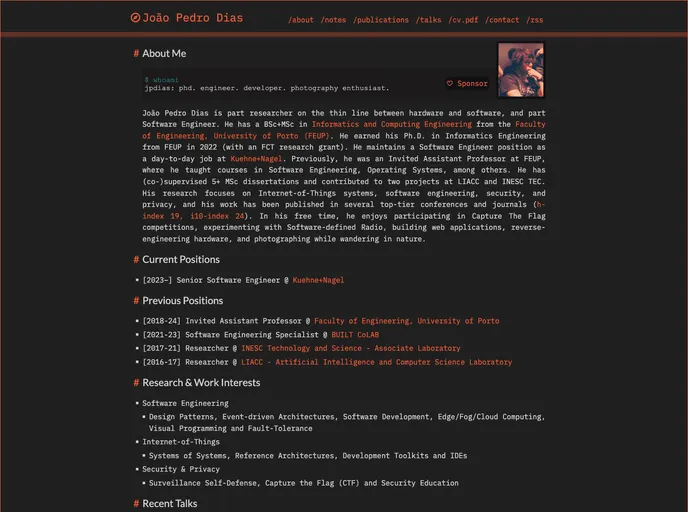
Overview
The Personal Page Website is a customizable platform that allows users to create their own personal website. It provides a user-friendly interface for individuals to showcase their portfolio, share their resume, and display their personal information. This platform is ideal for freelancers, creative professionals, and job seekers who want to establish an online presence and showcase their work.
Features
Customizable Templates: The Personal Page Website offers a wide range of customizable templates that cater to different industry needs and personal preferences. Users can easily select and customize a template to create a unique and visually appealing website.
Portfolio Showcase: This platform enables users to showcase their portfolio through a dedicated section on their personal website. Users can upload images, videos, and descriptions of their projects, allowing potential clients or employers to get a comprehensive view of their work.
Resume Display: The Personal Page Website provides a dedicated space for users to display their resume. Users can create an aesthetically pleasing and informative resume layout that highlights their skills, experience, and education.
Responsive Design: The platform ensures that personal websites created using their templates are responsive and compatible with different devices. Users can rest assured that their website will look great and function well on desktops, tablets, and mobile devices.
Installation
To install the Personal Page Website theme, follow these steps:
- Open your preferred code editor (e.g., Visual Studio Code).
- Create a new project folder for your website.
- Download the latest version of the Personal Page Website theme from the official website.
- Extract the downloaded theme files to the project folder.
- Open the project folder in your code editor.
- Customize the theme by editing the HTML, CSS, and JavaScript files according to your preferences.
- Preview your website locally by opening the index.html file in a web browser.
- Once satisfied with the changes, upload the entire project folder to your web hosting server.
Summary
The Personal Page Website is a user-friendly platform that allows individuals to create their own personal websites. Its customizable templates, portfolio showcase, resume display, and responsive design make it an ideal choice for freelancers, creative professionals, and job seekers looking to establish an online presence. With easy installation and customization options, users can create visually appealing and functional websites to showcase their work and personal information.



































