



 Github Stars:
 Last Commit:
  Created: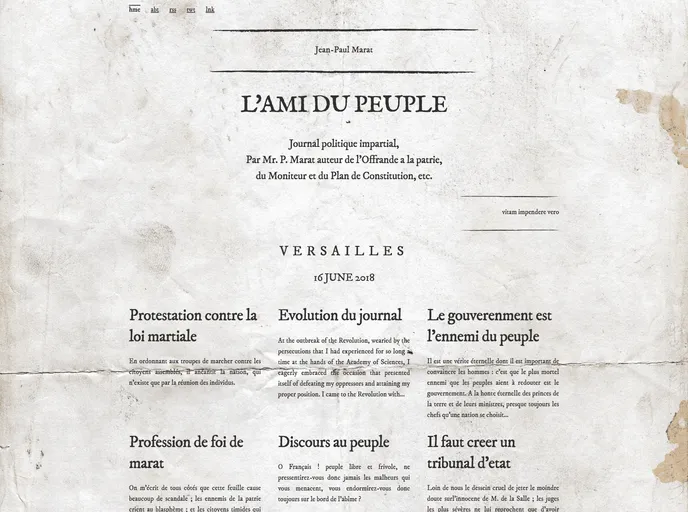
Overview
Marat is a theme that aims to revive the values of the Enlightenment, inspired by Jean-Paul Marat’s newspaper during the French Revolution. It is a fully responsive theme that allows users to customize various aspects of their website.
Features
- Enlightenment Inspiration: Marat draws inspiration from Jean-Paul Marat’s newspaper, L’Ami du peuple, which advocated for the rights of man and liberty during the French Revolution.
- Config Customization: Users can adapt the _config.yml file to customize various settings of the theme to better suit their needs.
- Content Modification: Users can easily replace or delete existing posts, change the about.md page, and add/edit links in the nav.yml file found in the _data folder.
- Favicon Customization: Users have the ability to replace the default favicon.ico file with their own custom favicon.
- 404 Page Customization: Marat offers the option to customize the 404.md page in the root directory to provide a personalized error page.
- Responsive Design: Unlike Marat’s pamphlets, the theme is fully responsive and compatible with different devices and screen sizes.
- Plugins Support: Marat includes the jekyll-roman and jekyll-seo-tag plugins to enhance the functionality and SEO optimization of the theme.
Installation
To install Marat, follow these steps:
- Copy the Marat theme files to your Jekyll website directory.
- Open the _config.yml file and make any necessary customizations.
- Replace or delete the existing posts with your own content.
- Modify the about.md file according to your website’s information.
- Edit the nav.yml file in the _data folder to add or modify the navigation links.
- Replace the favicon.ico file with your own custom favicon.
- Customize the 404.md page in the root directory to provide a personalized error page.
- Run the command
bundle exec jekyll serve --watchto start the Jekyll server and preview your website. - Enjoy the Enlightenment-inspired design and customization options of the Marat theme.
Summary
Marat is a theme that draws inspiration from Jean-Paul Marat’s newspaper during the French Revolution. It offers various customization options, including config modifications, content changes, favicon replacement, and 404 page customization. With its responsive design and support for plugins, Marat provides users with a visually appealing and functional theme to showcase their content.



































