



 Github Stars:
 Last Commit:
  Created:
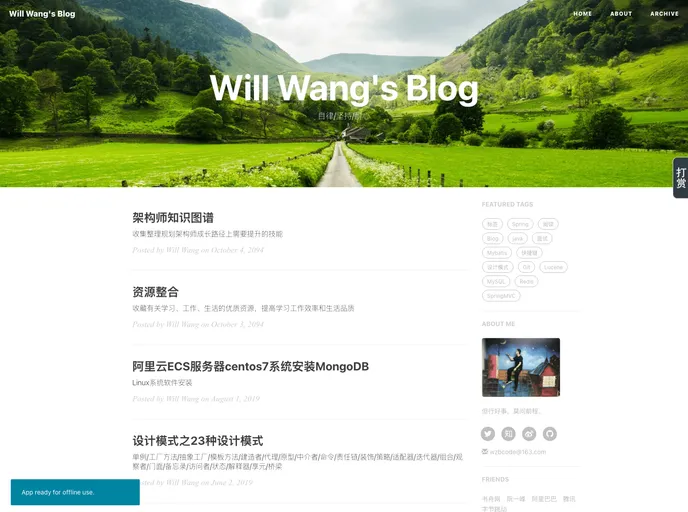
Overview
This content appears to be a product analysis or tutorial for setting up a personal blog using the Jekyll platform. The analysis provides details on the various features and functionalities of the blog theme, such as installation steps, customization options, layout settings, social media integration, commenting systems, and website analytics. It also includes tips for optimizing search engine visibility and addressing potential issues during the installation process.
Features
- Blog setup tutorial with detailed instructions and modifications based on Hux theme
- Easy installation process using Jekyll and command line
- Responsive layout design with sidebar, mini about me section, featured tags, and friend links
- Customizable header image and SEO title for improved branding and search engine visibility
- Integration with social media accounts and support for various commenting systems (Disqus, Gitalk)
- Website analytics using Baidu Statistics and Google Analytics
- Article sharing and recommendation features
- JavaScript implementation for article donation functionality
Installation
Below are the steps to install and set up the blog theme:
- Install Jekyll and Ruby if not already installed
- Clone the theme repository or download the theme files
- Update the config file (_config.yml) with desired settings
- Customize the layout, sidebar, and about me sections in the respective files
- Add social media account links in the sidebar
- Configure friend links and featured tags in the config file
- Set SEO title and header image for each page
- Customize the article donation functionality using JavaScript
- Configure website analytics with Baidu Statistics or Google Analytics
- Test the blog locally using the Jekyll server command
- Deploy the blog to a web server or hosting platform
Summary
The content analyzed provides a comprehensive guide to setting up a personal blog using the Jekyll platform. It covers various features and functionalities of the blog theme, including installation steps, layout customization, social media integration, commenting systems, website analytics, and article recommendation. The analysis also provides tips for optimizing search engine visibility and addressing potential issues during the installation process.



































