



 Github Stars:
 Last Commit:
  Created: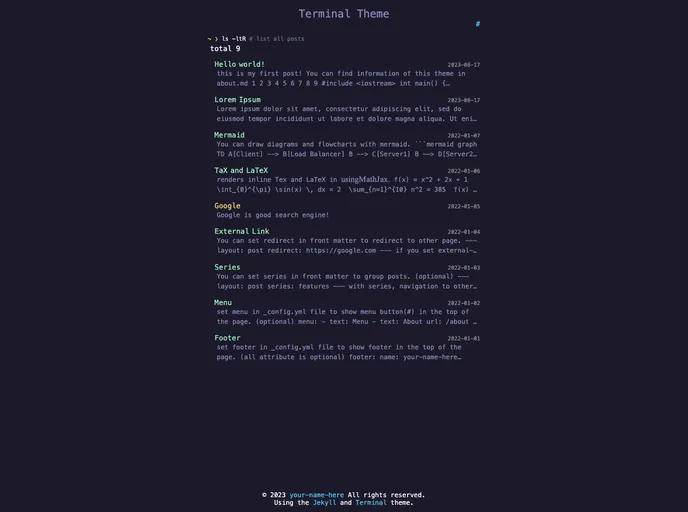
Overview
The Jekyll Terminal Theme is a visually appealing and user-friendly theme designed for Jekyll websites. It features a terminal-inspired design that gives the website a modern and unique look. With its sleek interface and easy navigation, this theme is perfect for developers, bloggers, and anyone looking to showcase their work in a stylish and interactive manner.
Features
- Terminal-inspired Design: The theme adopts a sleek and modern design, resembling a command line terminal, giving your website a distinctive aesthetic.
- Responsive Layout: The theme is fully responsive, ensuring that your website looks great and functions well on all devices, including desktop, tablet, and mobile.
- Customizable Configuration: The theme allows you to easily customize various aspects such as colors, fonts, and content, allowing you to create a personalized website that matches your branding.
Installation
To install the Jekyll Terminal Theme on your local machine, follow the steps below:
- Clone the repository to your local directory using the following command:
git clone https://github.com/fienestar/jekyll-terminal-theme.git
- Navigate to the cloned directory:
cd jekyll-terminal-theme
- Install the necessary dependencies by running:
bundle install
- Start the Jekyll server:
bundle exec jekyll serve
- Open your web browser and visit http://localhost:4000 to view the theme in action.
Summary
The Jekyll Terminal Theme is a stylish and functional theme for Jekyll websites. Its terminal-inspired design, responsive layout, and customizable configuration make it a great choice for developers and bloggers looking to create a visually appealing and interactive website. With easy installation instructions, you can quickly set up the theme on your local machine and start customizing it to suit your needs.



































