



 Github Stars:
 Last Commit:
  Created:
Overview
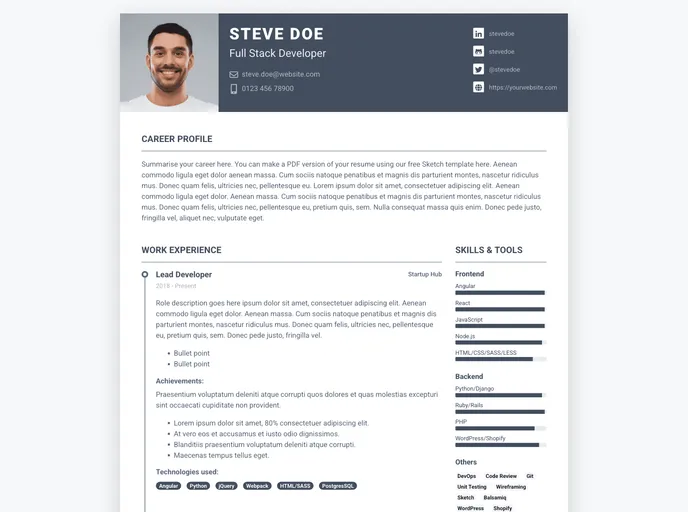
The Pillar theme, designed by Xiaoying Riley at 3rd Wave Media, is a versatile and visually appealing theme for websites. With its clean and modern design, Pillar offers a range of impressive features that make it a popular choice for many users.
Features
- Clean and Modern Design: The Pillar theme showcases a sleek and contemporary design that enhances the visual appeal of any website.
- Versatility: This theme is highly versatile and can be used for various types of websites, including blogs, portfolios, and business websites.
- Responsive Layout: Pillar is built with a responsive design, ensuring that the website adapts seamlessly to different screen sizes and devices.
- Easy Customization: Users can easily customize the Pillar theme to suit their specific needs and preferences, thanks to its user-friendly customization options.
- SEO Friendly: With its SEO-friendly structure and code, Pillar helps improve the website’s visibility and search engine rankings.
- Cross-Browser Compatibility: The theme is compatible with all major web browsers, ensuring a consistent experience for users regardless of the browser they use.
- Well-Documented: Pillar comes with comprehensive documentation that guides users through the installation and customization process.
- Customer Support: Users can rely on the support team at 3rd Wave Media for any queries or assistance related to the Pillar theme.
Installation
To install the Pillar theme, follow these steps:
- Download the theme zip file from the official website or your preferred source.
- Extract the downloaded zip file to your computer.
- Upload the extracted folder to your website’s theme directory.
- Log in to your website’s admin panel.
- Navigate to the Appearance section and select Themes.
- Locate the Pillar theme and click on the Activate button.
Your website is now using the Pillar theme!
Summary
The Pillar theme by Xiaoying Riley offers a visually appealing and versatile design, making it a popular choice for various types of websites. With features such as a responsive layout, easy customization options, and SEO-friendly structure, Pillar provides users with a seamless and user-friendly experience. The well-documented nature of the theme and the availability of customer support further enhance the overall user experience.



































