



 Github Stars:
 Last Commit:
  Created: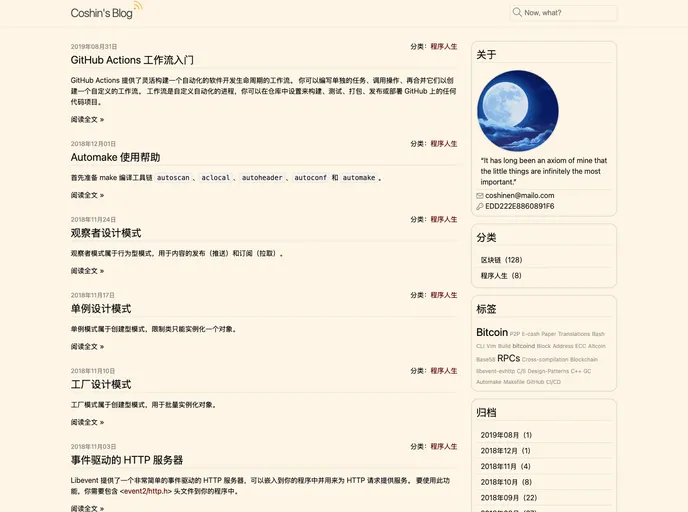
Overview:
Paraverse is a versatile Jekyll theme designed to provide a seamless and adaptable experience for creating posts. It is built upon Jekyll’s initial theme, minima, and offers a one-size-fits-all solution for content creators.
Features:
- Versatility: Paraverse is designed to cater to a wide range of content creation needs.
- Based on minima: The theme is built upon Jekyll’s original theme, minima, providing a solid foundation.
- Open source: Paraverse is available as an open-source project under the MIT license.
- Flexible licensing: All posts created with Paraverse are released under the CC BY-NC-ND 4.0 License, ensuring proper attribution and restrictions.
Installation:
To install Paraverse, follow these steps:
- Open your command line interface.
- Navigate to your desired Jekyll project directory.
- Run the following command to clone the Paraverse repository:
git clone [repository URL]
- Once the cloning process is complete, navigate into the Paraverse directory using the
cdcommand:
cd paraverse
- Install the required dependencies by running the following command:
bundle install
- To start your Jekyll server and view the Paraverse theme locally, run:
bundle exec jekyll serve
- Access the Paraverse theme in your browser by visiting
http://localhost:4000.
Summary:
Paraverse is a Jekyll theme that provides a comprehensive solution for creating posts. It offers flexibility, being based on Jekyll’s minima theme, and is available as an open-source project. With Paraverse, content creators can confidently create and share their work, knowing that proper licensing and attributions are in place.



































