



 Github Stars:
 Last Commit:
  Created: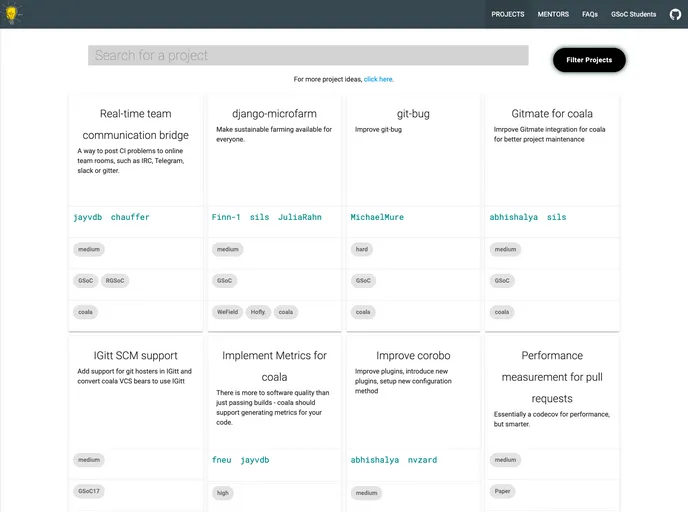
Overview
Projects is a website that showcases projects and is designed for initiatives like GSoC, research theses, GCI, and others. It aims to make project ideas more concise and appealing to students by providing a search and filter feature. The website also offers a proper review process for triaging and iterating on project ideas. It eliminates the need for maintaining a mentors list, as it can be generated from the projects themselves.
Features
- Search and filter: Projects can be searched and filtered based on specific criteria.
- Project ideas as structured data: Project ideas are presented as structured data, making them more concise and ensuring that all points are covered. Detailed information is shown only when needed.
- Review process: The website provides a proper review process for triaging and iterating on project ideas.
- Generates mentors list: The mentors list can be automatically generated from the projects.
- Supports multiple languages: The website supports multiple languages, allowing for translations of projects and FAQs.
Installation
To install and run the Projects website, follow these steps:
- Install asdf-vm for your operating system.
- Using asdf-vm, install Ruby.
- Clone the coala Projects repository.
- Run the coala Projects website.
- Access the site by visiting one of the following addresses in your browser:
- [address1]
- [address2]
If you encounter any issues while installing Jekyll or using its gem bundler, you can refer to the troubleshooting documentation.
Summary
Projects is a website that showcases projects and is designed for initiatives like GSoC, research theses, GCI, and more. It offers features such as search and filter, structured project data, a review process, automatic generation of the mentors list, and support for multiple languages. The installation process involves installing asdf-vm, Ruby, and cloning the coala Projects repository. Overall, Projects provides a user-friendly platform for presenting and managing projects.



































