



 Github Stars:
 Last Commit:
  Created: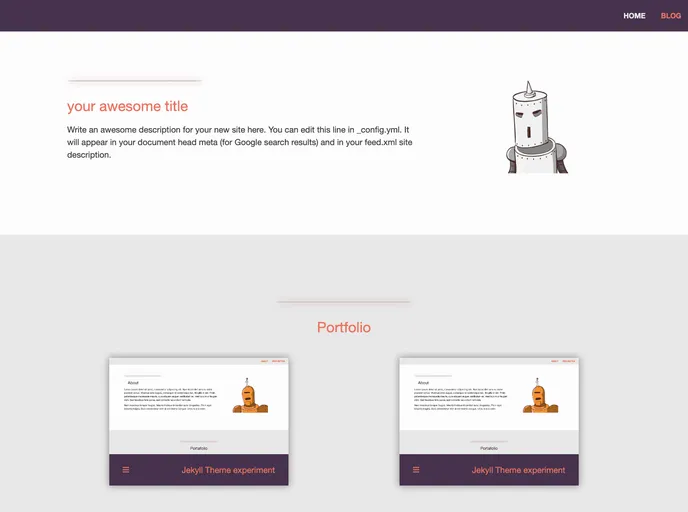
Overview
The Jekyll theme “jekyll-theme-experiment” is a portfolio theme created by @anxhe. Designed to showcase a portfolio, the theme is customizable and allows users to add their own content. It is made with love and is available for free under the MIT License.
Features
- Customizable sections for about, portfolio, and tools.
- Easy installation process.
- Ability to customize navigation links.
- Support for blogging.
- Bug reports and pull requests welcome on GitHub.
Installation
To install the “jekyll-theme-experiment” theme, you will need to have Ruby installed on your system. Once Ruby is installed, follow these steps:
- Open a bash terminal.
- Execute the following commands:
gem install bundler jekyll - Create a new Jekyll site by running the following command:
jekyll new my-portfolio - Install the necessary gems by running the following command:
cd my-portfolio bundle install - Open the
Gemfilein a text editor and replace theminimagem withjekyll-theme-experiment:gem "jekyll-theme-experiment", "~> 1.0" - Open the
_config.ymlfile in a text editor and replace thethemekey withjekyll-theme-experiment:theme: jekyll-theme-experiment - Replace the sample data in the
_config.ymlfile with your own content. - Customize the sections in the main layout (
index.html) for about, portfolio, and tools with your own content. - Replace the sample data in the markdown files (
index.md,about.md,portfolio.md,tools.md) with your own content.
Summary
The “jekyll-theme-experiment” is a customizable Jekyll theme designed for portfolio websites. It offers easy installation, customizable sections, and support for blogging. Users can personalize the theme by adding their own content and customizing the navigation links. The theme is open source and available under the MIT License. It is a great choice for showcasing a portfolio in an attractive and professional manner.



































